You don’t have a feedback problem. You’ve got a timing problem.
By the time the monthly survey lands, the moment has gone. The customer has moved on. The review has already been written. The issue has repeated itself across five sites, three shifts, and a weekend rush you’ll never get back.
That’s why real time feedback matters. Not because it gives you more data. Because it gives you the chance to do something while it still counts.
When you capture feedback as the experience is happening, you can fix the thing that’s annoying customers before it becomes your new normal. You can protect standards. You can save a team from firefighting. And you can stop small issues turning into the kind of reputational drag that quietly costs you sales.
Customer experience leaders keep saying the same thing: experience is now a real differentiator, not a nice-to-have. You feel that pressure every day. Source: assets.kpmg.com
In this guide, I’ll walk you through what real-time feedback actually means in physical spaces, how feedback terminals and smiley face feedback work best, and how to turn ‘someone tapped unhappy’ into ‘it’s already sorted’.
What ‘real time feedback’ actually means in physical spaces
Let’s keep this simple. Real time feedback is feedback you capture at the point of experience, close enough to the moment that you can still change the outcome. Not next week. Not after the monthly report. Now.
In physical environments, that usually means:
- A quick rating at the exit, checkout, reception, or washrooms
- A one-tap response right after the interaction
- A short follow-up question only when it’s needed
The biggest advantage is honesty. In-the-moment reactions are less filtered. Customers don’t have to remember how they felt. They just tell you.
But speed is only half the story. You also need a system that helps you respond quickly, because customers care far more about what you do next than what you measure.
That ties into a bigger point. Consumer expectations around prompt responses and effective resolution are now central to how people judge service. If you’re slow, it shows.
So real time feedback is not ‘live data’. It’s live action.
Why delayed feedback fails in retail, hospitality and FM
Delayed feedback creates a dangerous illusion: it feels like you’re listening, but you’re not learning fast enough to improve.
Here’s what happens when insight arrives late:
- Retail: the queue problem becomes ‘just how Saturdays are’. Fitting rooms drift. A shop looks tired by 2pm. You hear about it after the weekend.
- Hospitality: one bad rush can trigger a run of low ratings, and suddenly the team is defending scores instead of improving service.
- Facilities management: small misses in hygiene, maintenance, or compliance build up quietly, then show up as a failed audit, a complaint, or a contract risk.
Even when you do have data, it often sits in silos. Surveys in one place. Complaints in another. Reviews somewhere else. Spreadsheets everywhere. That’s when teams waste time stitching together what happened, instead of fixing what’s happening.
FM leaders are also under growing pressure to modernise operations with the right tech, while still dealing with staffing, budgets, and compliance complexity. That’s driving a clear shift toward smarter, more connected ways of working.
Delayed feedback makes you reactive. Real-time feedback helps you stay in control.
Feedback terminals: the fastest way to capture real time feedback on-site
If you want volume, speed, and simplicity, feedback terminals are hard to beat.
They’re designed for high-footfall, real-world environments where customers won’t fill out forms, won’t scan long surveys, and won’t do anything that feels like effort.
A feedback terminal gives you:
- One clear question
- A fast response (often a tap)
- An immediate signal you can act on
You’ll typically see terminals placed:
- At store exits
- Near checkouts
- In washrooms
- At reception desks
- At service counters
- In lobbies and lift areas
The key is placement. Put terminals at a natural pause point, right after the moment you want to measure. This in-store ‘micro-feedback’ produces patterns you can use operationally, including clear time-of-day and day-of-week performance swings.
If you want to see how Serve First approaches terminals specifically, this link lays out the practical toolkit and real-world deployment options.
Smiley face feedback: quick signal, real operational value
Smiley face feedback works because it’s human, low effort, and contextual. No one has to think hard. No one has to translate a scale. No one has to commit to a survey. They just tap what they feel and move on.
That’s why smiley face feedback performs so well in:
- Busy spaces
- Mixed audiences
- Short interactions
- High-volume environments
But here’s the honest truth: a smiley scale is a signal, not a diagnosis. It tells you something has changed. It tells you where to look. It tells you when you need to intervene. It doesn’t magically explain why.
That’s where smart follow-ups come in. The best setups use:
- A single tap to capture sentiment
- A short follow-up only when someone taps neutral or unhappy
- A lightweight comment prompt when you need context
The five-minute rule: what happens after someone taps ‘unhappy’
This is where most businesses lose the value. They capture the tap. They log it. It appears on a dashboard. Then nothing happens until the next meeting.
That’s not real-time feedback. That’s real-time data storage.
A better way to run this is a simple operating loop:
Signal → route → fix → confirm → learn
Signal: Someone taps unhappy. That’s your early warning.
Route: The issue goes to the right person, fast. Not everyone. Not head office. The owner.
Fix: A practical first action happens within minutes, based on a playbook.
Confirm: Someone marks the action complete. Now you’ve got accountability, not just numbers.
Learn: You spot patterns across locations, shifts, or time windows and prevent repeats.
Here’s how that looks in the real world:
- Retail: A customer taps unhappy at the changing room terminal. The store lead gets an alert tied to that location. A team member checks it immediately, clears rails, fixes lighting, resets mirrors.
- Hospitality: Guests tap unhappy near the counter during a rush. The manager gets a prompt that the score dropped sharply in a short window. They open another till and redeploy one person to queue management.
- Facilities Management: A washroom terminal dips. A task triggers to the onsite team, linked to the cleaning SOP. The issue is resolved before it becomes a complaint, and you’ve got a traceable record of action.
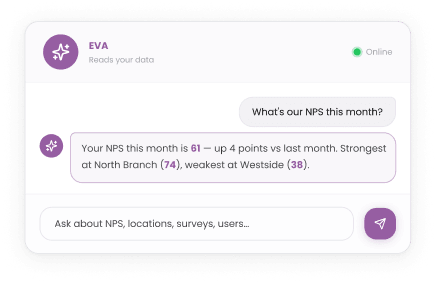
This is exactly the gap Serve First is built to close. The platform is designed to route feedback instantly, turn it into AI-generated insights, and push ready-to-use actions into the flow of work, from frontline teams to leadership.
How to avoid alert fatigue and make real time feedback stick
Real time feedback fails when alerts become noise. If every dip triggers a ping, your team will start ignoring pings. That’s not a people problem. It’s a rules problem.
To keep it useful:
- Use thresholds: alert on meaningful drops, not tiny wobbles
- Set ownership: one alert, one owner, one next step
- Add escalation: if it stays unresolved, it steps up automatically
- Protect focus: not every insight needs a notification
Hospitality is a good reminder here. Satisfaction with responses can influence intent to stay, and more thoughtful, tailored responses perform better than generic ones. That’s a useful signal for how you handle review and service recovery workflows too.
So don’t just alert fast. Respond well. Make the next step clear.
How AI turns raw responses into “do this next” actions
The bigger your operation, the faster feedback becomes overwhelming.
AI helps because it does the boring part at speed:
- It spots patterns across sites and time periods
- It identifies what changed
- It highlights what matters most right now
- It suggests next actions based on your playbooks and standards
This is the difference between ‘here are 10,000 responses’ and ‘here are the three issues to fix first today’.
Done properly, AI doesn’t replace judgement. It removes friction. It gives your team a practical assistant that keeps standards on track, without asking managers to become analysts.
Serve First’s roadmap goes even further, aiming toward an operational intelligence layer where real-time insight connects directly to workflows, SOPs, and learning, so you can improve faster and repeat less.
Real-world scenarios across retail, hospitality and FM
Retail: protecting basket size
You’re running a multi-site retailer. Afternoon scores dip every weekend. You stop guessing and use terminals to track checkout experience by time window. The pattern is clear: queues spike 1pm to 3pm. You adjust staffing, and you trigger a simple ‘open till two’ workflow when the score drops. Your teams act in minutes, not meetings.
Hospitality: saving the rush
A fast casual brand sees dips after 7pm. Terminals catch it in the moment. A regional lead sees it’s not service quality. It’s time and effort. Guests are waiting too long for ordering. The fix is operational: shift one team member, pre-stage prep, and add a queue role during peak.
Facilities Management: proving standards
In FM, the challenge is often visibility. The work is happening, but proving it consistently across sites is hard. Real-time feedback gives you immediate signals, and workflows create traceable action. That matters in a world where FM leaders are actively exploring how technology can support better outcomes and more resilient operations.
Choosing the right real time feedback tool mix
The best setup is rarely one thing. It’s a mix where each channel does a clear job:
- Feedback terminals for fast, in-the-moment signals in physical spaces
- Smiley face feedback for quick sentiment at high-volume touchpoints
- QR or short links for optional context when someone wants to explain
- Reviews and surveys for deeper perception and long-term trends
What to avoid:
- Collecting feedback without a response process
- Buying multiple tools that don’t integrate
- Measuring everything and improving nothing
If you’re building a modern, action-led approach, you’ll usually get better outcomes from one connected platform than five disconnected tools.
Real time feedback that leads to action
Real time feedback is not about seeing problems faster. It’s about fixing them faster.
When feedback is captured in the moment and routed to the right owner with a clear next step, you stop guessing. You stop firefighting. You start improving on purpose, every day, across every site.
If you want to see what that looks like in your world, Serve First can show you how terminals, AI insight, and automated workflows fit together, without adding complexity.
Request a demo and see how Serve First helps you turn real-time feedback into real-world action.
Real time feedback tools FAQs
Where should feedback terminals be placed for the best real time feedback?
The best feedback collection happens at natural pause points, right after the experience you’re measuring. Common placements include exits, checkouts, reception desks, washrooms, service counters, and waiting areas where feedback buttons or feedback kiosks fit naturally into the flow.
What’s the best question to use on a smiley face feedback terminal?
Use one clear, moment-specific question that links directly to customer satisfaction, such as ‘How was checkout today?’ or ‘Was the washroom clean?’ Smiley faces work best when questions are focused, actionable, and easy to respond to in seconds.
How many feedback terminals do I need for a multi-site operation?
Start with one Smiley Terminal or Smiley Terminal Tablet at a high-impact touchpoint per site. Once your feedback process, ownership, and workflows are in place, you can expand to additional locations where feedback data shows variation in service or experience.
How do you stop staff ignoring real time feedback alerts?
Make alerts meaningful. Set clear thresholds, assign a single owner, and define the first action required. When feedback data connects to visible action and employee engagement improves, alerts support operational excellence instead of becoming background noise.
Can real time feedback support facilities management compliance and auditing?
Yes. When customer feedback triggers tasks and tracks resolution, it becomes part of your customer feedback system and audit trail. This shows not just what was reported, but what action was taken to maintain standards and compliance.
What response time should we aim for after negative real time feedback?
For frontline issues, aim for a visible first response within minutes. Whether it’s a queue issue, cleanliness concern, or service delay, fast action turns negative customer feedback into a recovery moment that protects customer satisfaction.
How do you connect feedback terminals to helpdesk or CRM workflows?
Choose platforms that integrate feedback kiosks, QR codes, and smiley emojis directly into your helpdesk or CRM. That way, feedback buttons can automatically create tickets, assign tasks, and track completion without manual re-entry.
Is smiley face feedback reliable, or is it too simple?
Smiley face feedback is reliable as a high-volume sentiment signal. Smiley terminals and smiley emojis make it easy to spot trends quickly. When needed, add lightweight follow-up questions to understand the ‘why’ behind the score.
How do real time feedback tools improve Google reviews over time?
Real time customer feedback helps teams fix problems before customers leave and write negative reviews. By reducing repeat issues and improving consistency, businesses typically see stronger ratings and fewer surprises on public review platforms.
How should we report real time feedback to exec teams without drowning them?
Keep reporting simple. Share a weekly summary that highlights trends, hotspots, and actions taken, not just raw scores. Executives want confidence that the feedback process is improving performance and customer relationships, not more data to analyse.